
How it works
Stop trusting one AI. Ask the Council.
Submit one question. SearchCouncil sends it to multiple leading AI engines based on the Council depth you choose. SearchCouncil compares independent answers and produces a Council Verdict you can inspect.
30 free credits every month. No credit card required.
One AI gives you an answer. SearchCouncil gives you a verdict. If several models independently agree, that agreement matters. If they disagree, that disagreement matters too. SearchCouncil helps you see both.
The SearchCouncil solution
One question in. Multiple independent answers. Agreement scored. Disagreements flagged. One clear verdict out.
Ask once
Submit one question. SearchCouncil sends it to multiple leading AI engines based on the Council depth you choose.
Compare every answer
Each model responds independently, so you can see different reasoning, assumptions, and recommendations side by side.
Surface disagreement
SearchCouncil flags conflicts, weak spots, missing context, and model-specific blind spots.
Generate the Council Verdict
A Judge synthesizes the responses into one clear result with confidence, reasoning, caveats, and next steps.
Share the result
Create a view-only link so teammates, clients, or collaborators can review the full Council Verdict without rerunning the search.
Step 1: Choose Your Council Type
SearchCouncil has five modes. Pick the one that fits your question — from a single-engine direct ask to a full parallel council or a two-model convergence volley.
Direct
One engine — fastest path to an answer.
Pick one model. It answers your question, then SearchCouncil synthesizes a brief verdict. Best when you want a quick, low-cost answer without convening the full council.
- Quick factual questions
- Lowest credit cost
- When one trusted model is enough
Council
Every model answers. Judge synthesizes.
Each council member answers your question independently at the same time. The judge compares all answers and writes one Council Verdict. Best when you want maximum coverage and independent perspectives.
- Everyday decisions with several angles
- Vendor or option comparisons
- When agreement and disagreement both matter
Sequential
Fast — pass the answer to the next
One council member answers first, then passes that answer to the next member in order. When every seat has contributed, the judge synthesizes a Council Verdict. Best when you want a lighter, faster run.
- Quick second opinions
- Brainstorming chains
- Lower credit cost per seat
Convergence
Two AIs challenge and refine each other
Pick two engines. One answers, the other challenges it, they revise and check for agreement — then SearchCouncil produces a verdict classified as consensus, qualified consensus, or persistent split. Best when you want depth without a noisy multi-model debate.
- High-stakes factual questions
- When you want pressure-tested reasoning
- Finding exactly where credible models still disagree
Research
Many questions. Many councils. One final verdict.
Break a big topic into sub-questions. Each question runs through the council — every model answers, the judge synthesizes a verdict per question. Then a final verdict draws on all of those findings.
- Due diligence
- Market scans
- Multi-angle strategy prep
Sequential sample
Each member builds on the previous answer before the judge synthesizes.
Step 2: Ask Anything
Start by typing your question once. You can ask something simple, practical, strategic, technical, creative, or research-heavy — or pick a use case to see the kind of question the Council is built for.
Choose a use case
Your question
Should we acquire BrightLedger for $18M if revenue is growing 42% year over year, but churn increased from 7% to 14%?
Instead of rewriting the same question in five different chatbots, SearchCouncil sends it to the council for you.
Step 3: Choose Your Council Depth
SearchCouncil supports different levels of council depth depending on how much comparison you need.
Quick Council
2–3 fast engines · fast signal
Best for everyday questions. Quick Council uses faster, lower-cost models to give you a useful comparison without burning unnecessary credits.
Use it for:
- Simple recommendations
- Brainstorming
- Quick second opinions
- Everyday research
- Lightweight comparisons
Moderate Council
3–5 balanced engines · standard council
Best for most serious questions. Moderate Council uses a balanced set of models to give you stronger coverage, better comparison, and more reliable synthesis.
Use it for:
- Business decisions
- Strategy questions
- Marketing ideas
- Vendor comparisons
- Technical planning
- Research summaries
Deep Council
5–7 premium engines · detailed reasoning & caveats
Best when the answer really matters. Deep Council uses more powerful models and a broader set of perspectives. It costs more credits, but gives the council more room to reason, compare, and catch differences.
Use it for:
- High-stakes decisions
- Complex research
- Technical architecture
- Legal-adjacent or financial-adjacent analysis
- Important business recommendations
- Questions where disagreement is likely
Council depth controls how many and what type of AI engines participate in the council.
Step 4: Each AI Council Answers Independently
In Council mode, each model answers the same prompt on its own. This matters. The models do not start by seeing each other’s answers. They give independent responses first, which makes agreement more meaningful.
In Sequential mode, members answer one after another — each building on the previous answer before the judge synthesizes.
In Convergence mode, you pick two engines. One answers, the other challenges it, they revise and check for agreement — then the judge classifies the outcome as consensus, qualified consensus, or persistent split.
Different models may:
- Emphasize different facts
- Recommend different options
- Use different reasoning
- Catch different risks
- Make different assumptions
- Provide different levels of caution
- Surface different sources or examples
SearchCouncil keeps those differences visible.
Step 5: Detect agreement, gaps, and perspective signals
SearchCouncil compares each model against the Council as a whole. It looks for:
- where a model agrees with the consensus
- where it leaves out important context
- whether it relies on different source types
- whether its answer shows political, cultural, commercial, safety, recency, or authority lean
- whether the difference is meaningful or just wording
Then SearchCouncil summarizes those signals in plain English, so users can understand how much confidence to place in the verdict.
See platform-wide patterns on the Perspective IndexStep 6: The Judge Compares the Answers
After the council responds, a separate judge model reviews the answers. The judge is not just summarizing.
It looks for:
- → What the models agree on
- → Where the models disagree
- → Which claims are strongly supported
- → Which claims only one model mentioned
- → Which answer appears strongest
- → Which parts should be treated carefully
- → What should be excluded from the final verdict
- → What follow-up questions may be worth asking
The judge gives more weight to claims that multiple models support and treats lone, unsupported claims with caution.
Step 7: Choose Your Synthesis Depth
SearchCouncil also lets you control how detailed the final synthesis should be. This is separate from council depth.
Council depth controls how many and what kind of models answer.
Synthesis depth controls how hard the judge works on the final write-up.
Quick Synthesis
Consensus · major disagreement
Best when you want a short, direct answer. You get the strongest shared answer, major disagreement (if any), and a simple next step.
Moderate Synthesis
Agreement · disagreement · unsupported claims · recommendation
Best for a balanced verdict. You get main consensus points, meaningful differences, risky or uncertain claims, a practical recommendation, and suggested next steps.
Deep Synthesis
Claim audit · contradiction map · blind spots · confidence
Best for more rigorous review. You get consensus points, a contradiction map, claim audit, confidence score, missing context, blind spots, excluded weak claims, and a stronger final recommendation.
This lets you run a deep council with a quick answer, or a quick council with a more careful synthesis.
Step 8: Review Consensus
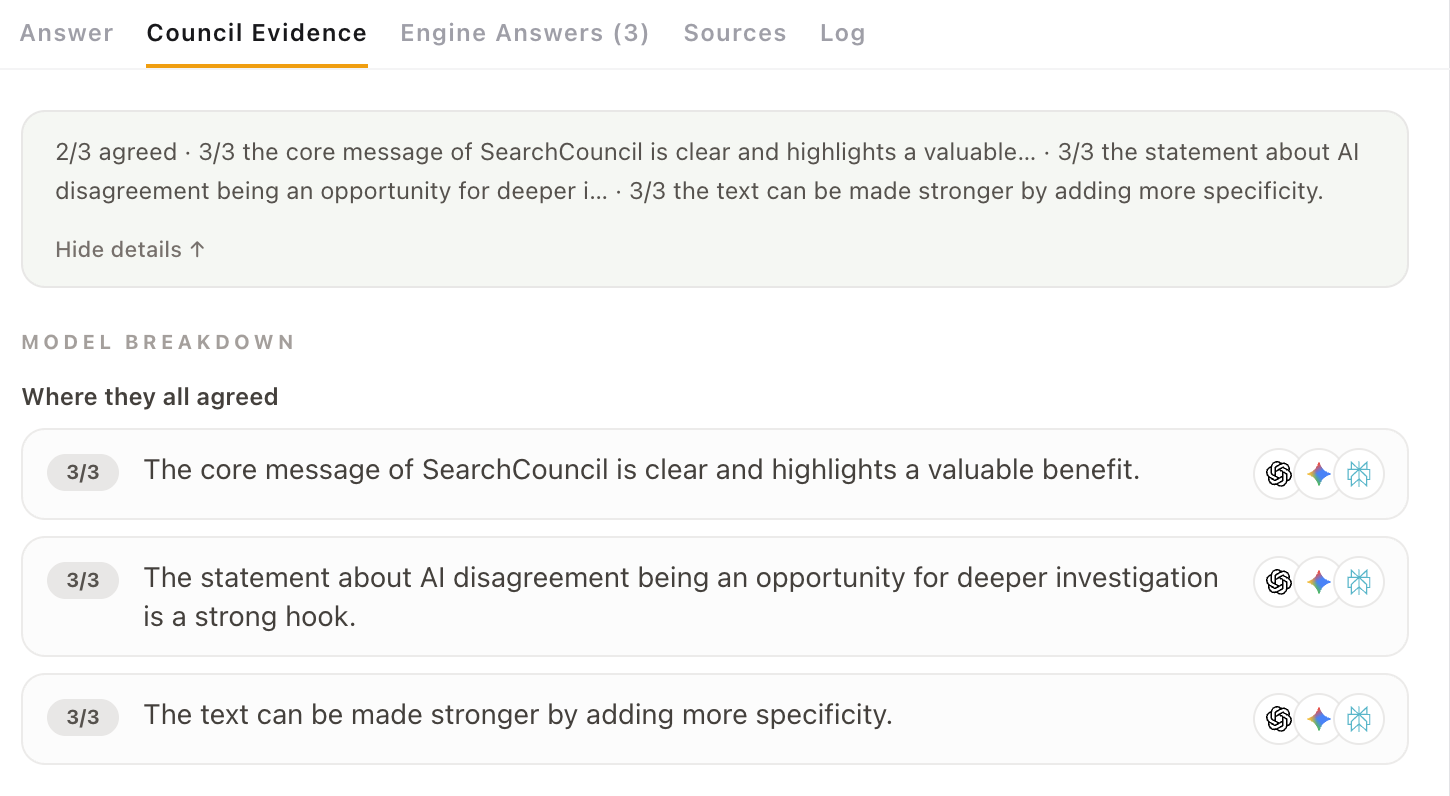
SearchCouncil does not hide the messy parts. Consensus shows agreement signals, model differences, blind spots, and the reasoning behind the verdict.
You can inspect:
- Individual AI responses
- Agreement score
- Disagreement highlights
- Contradictions
- Per-engine reasoning
- Claims that need caution
- Confidence level
- Why the final verdict landed where it did
This is the part that makes SearchCouncil different from a normal chatbot. You are not just reading a polished answer — you are seeing how the answer was judged.
Consensus
See how the verdict was judged — not just the answer
Every Council Verdict comes with a Consensus tab: agreement signals, model-by-model breakdowns, model differences, blind spots, and synthesis confidence — so you know what to trust.
See which claims every model supported — with a per-engine breakdown and agreement counts like 3/3.
Step 9: Read the Council Verdict
The Council Verdict is the final synthesized answer. It combines the strongest parts of the council responses while keeping disagreement and uncertainty visible.
A good Council Verdict should tell you:
- What the best answer appears to be
- Why the council leaned that way
- Where the models agreed
- Where they split
- What to double-check
- What to do next
The goal is not to average the answers. The goal is to curate the strongest answer from the council.
Step 10: Continue the Inquiry
After the verdict, you can keep going. Instead of starting over, SearchCouncil lets you continue the same thread.
Useful follow-ups include:
This turns a one-time AI answer into a structured inquiry.
Quick vs. Deep Search
Each council seat uses credits based on the model selected.
Quick Search
Quick search uses fast, capable models. Best for daily questions, brainstorming, and lightweight decisions.
- Lower credit cost
- Faster responses
- Good for most everyday questions
Deep Search
Deep search uses premium or reasoning models. Best for harder questions where accuracy, nuance, and comparison matter more.
- Higher credit cost
- Stronger reasoning
- Better for complex decisions
You can pick the level that matches the question. Not every question needs the expensive path.
Free Searches, Credits, and BYOK
SearchCouncil is designed to be easy to try and affordable to keep using.
Free Credits
Every account gets 30 free credits per month. Use them to test the product, ask everyday questions, and see how council-style AI comparison works.
Council Credits
Need more? Subscribe for $10/mo with 250 credits included, or buy extra Council Credit packs when you need more — without setting up API keys. This is the easiest option for most users.
See pricing →Bring Your Own Keys
Already have API access? Bring your own OpenAI, Anthropic, Google, Perplexity, xAI, or other supported provider keys. With BYOK, you use SearchCouncil as the interface, routing, comparison, history, and verdict layer while paying your AI providers directly.
BYOK is best for power users, developers, researchers, agencies, and anyone who already works with AI APIs.
The Simple Version
SearchCouncil works like this:
- 1 Choose your council type: Council, Sequential, Convergence, or Research.
- 2 Ask anything.
- 3 Multiple AI engines answer independently.
- 4 SearchCouncil compares the responses.
- 5 SearchCouncil detects agreement, gaps, omissions, source mix, and perspective signals.
- 6 A judge model identifies agreement, disagreement, risk, and confidence.
- 7 You get a Council Verdict.
- 8 You can inspect the evidence.
- 9 You can continue the inquiry.
- 10 Share a view-only link when someone else needs to review the verdict.
Instead of trusting one AI, ask the Council.
Share & collaborate
Send the council verdict to anyone who needs to see it
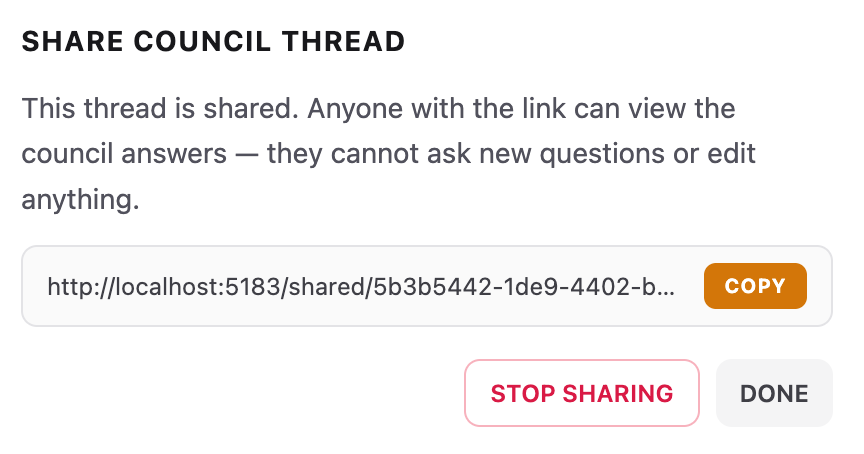
Share a view-only link to any thread. Teammates, clients, and collaborators can read every engine answer, the Council Verdict, and Consensus — without rerunning the search or pasting screenshots into Slack.
- ✓ One click to create a share link — copy and send
- ✓ Viewers don’t need an account to read a shared thread
- ✓ View-only: no edits, no new questions on shared links
- ✓ Stop sharing anytime — the link stops working immediately
Who Is SearchCouncil For?
Built for people who cannot afford to trust one AI
SearchCouncil compares answers from multiple leading AI models, surfaces agreement and disagreement, and delivers one Council Verdict.
- Researchers & Academics
- Business Decision-Makers
- Journalists & Content Creators
- Educators & Students
- Developers & AI Practitioners
- Legal, Medical & Financial Professionals
Common questions
- Is SearchCouncil just side-by-side chat windows?
- No. Side-by-side is step one. SearchCouncil also scores agreement, highlights disagreements, maps contradictions, and writes a Council Verdict — so you are not manually triangulating five answers every time.
- Why run the same question through multiple models?
- Models make different mistakes. When several independently agree on a point, that point is much more likely to hold up. When they diverge, that is your cue to dig in.
- What happens when the council disagrees?
- That is often the most useful result. SearchCouncil flags the disagreement in Consensus and still gives you a synthesized verdict — with the contested points called out, not hidden.
- Can I use my own API keys?
- Yes. Connect keys in Settings for supported providers, use SearchCouncil credits, or mix both on the same council. See the BYOK section on the pricing page for details.
- Can I share council results with my team?
- Yes. Any thread can get a view-only share link. Teammates and clients can read the council answers and verdict without signing in — they cannot edit the thread or ask new questions. You can stop sharing at any time.